What an SLA really means, and how to calculate your own
- ARCHITECTURE
- SRE
- CLOUD
"Available 99.99% of the time"
You have read this kind of sentence before: "our service is available 99.99% of the year, and if you hit a bug we get back to you within 2 hours." That is an SLA, a Service Level Agreement. It is a contract between a service provider and its client — and in this case, the client is your application.
The "X nines"
An SLA mostly covers uptime, and we express it as a number of nines.
- 99.5%: the service is down for 1 day, 19 hours and 48 minutes per year.
- 99.9% (three nines): down for 8 hours and 45 minutes per year.
- 99.99% (four nines): down for 52 minutes per year. Adding one nine is expensive, both in maintenance and in infrastructure. But in some cases, not paying for it costs more. Take a financial system processing €10,000 of transactions per minute: at 99.9%, those 525 minutes of yearly downtime amount to roughly €5.2 million of transactions that never went through.
That is why the SLA matters so much for large, global software.
Calculating your application's SLA
Picture a monolithic application hosted on a cloud provider — AWS, Google Cloud, it does not matter. It promises you 99.9% uptime. Your SLA is therefore 99.9%, because you depend on that provider.
Over time, you add an external database that promises 99.5%. Your SLA just dropped because of it. Availabilities do not average out, they multiply:
SLA = 99.9% × 99.5% = 0.999 × 0.995 = 0.994 ≈ 99.4%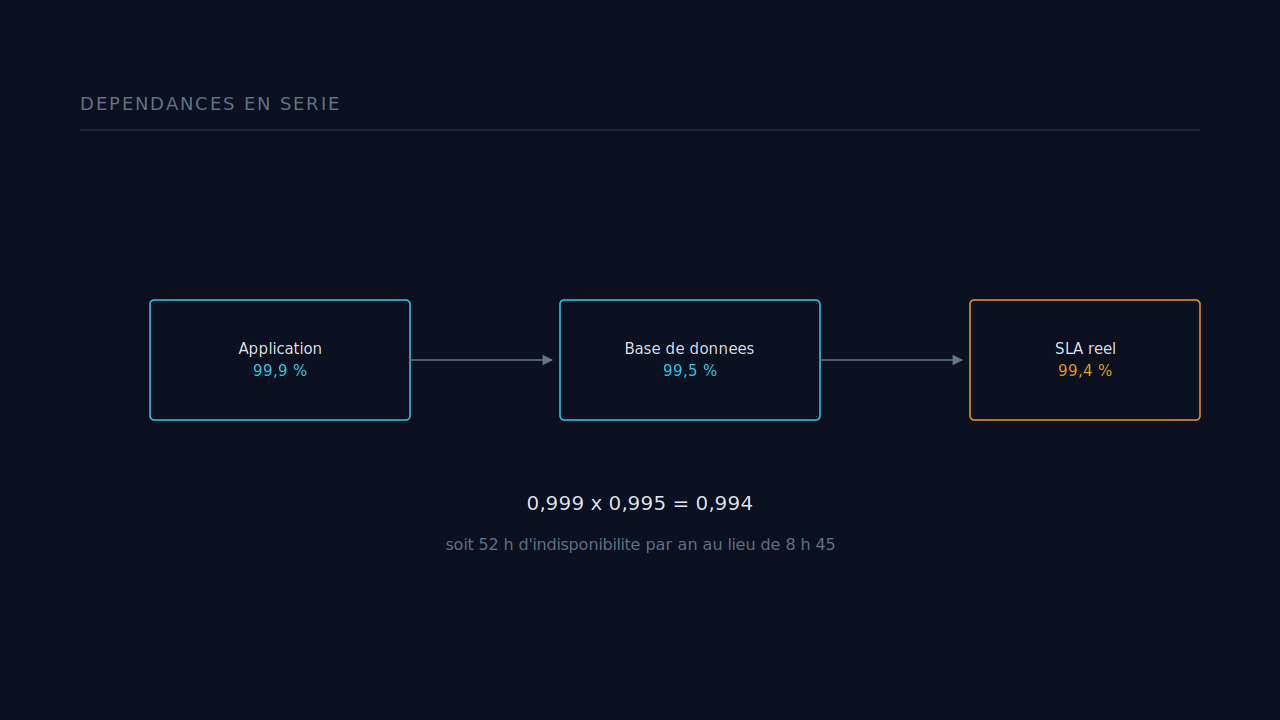
One dependency, and the yearly downtime budget goes from 8 hours to more than 52.
Bringing the SLA back up with a fallback
There is always a way out. You can add a fallback with a high SLA to pull the whole thing back up — a queue, or a second database. The component is only down when the primary and the fallback fail at the same time, so you multiply the unavailabilities:
SLA composant = 1 - [(1-  Primary Availability)* (1 - Fallback Availability)]
= 1 - [(1 - 0,995) × (1 - 0,999)] = 0,999995 ≈ 99,999 %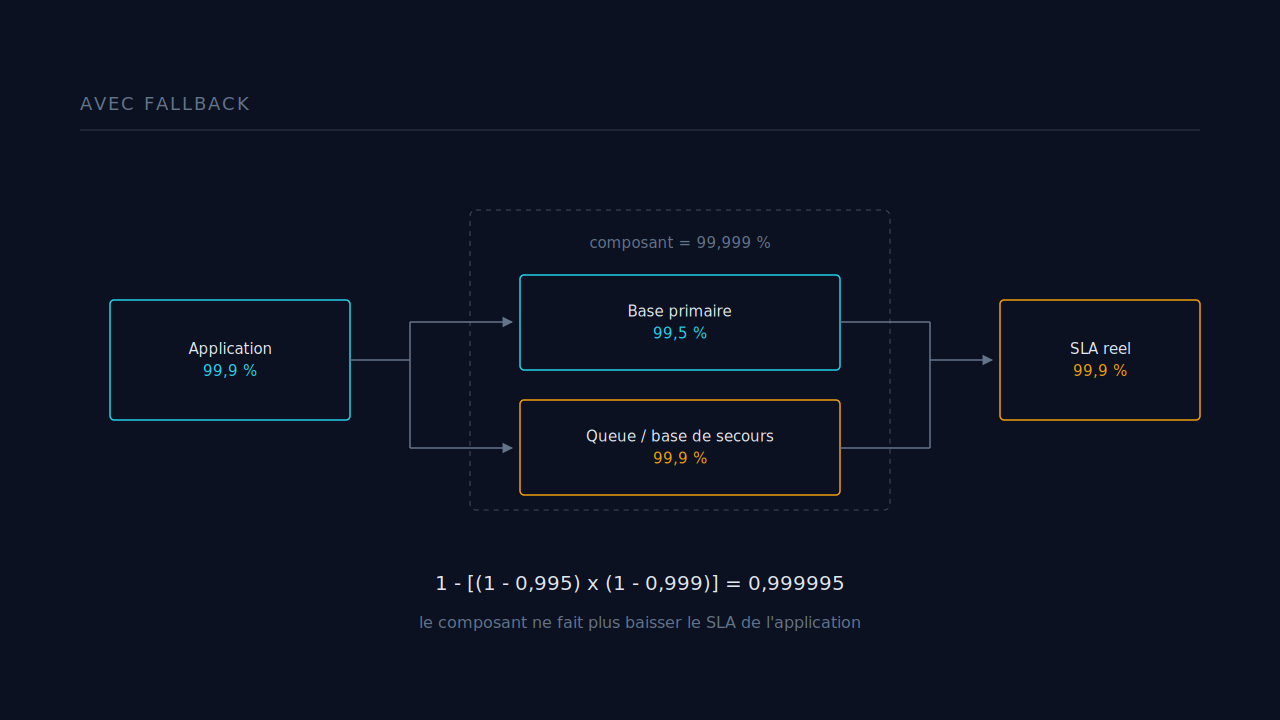
The database component is back up. Now recalculate the whole application:
Application SLA = 0.999 × 0.999995 ≈ 99.9%We are back to the ceiling set by the hosting provider. But at what cost?
What the maths does not tell you
Two limits worth keeping in mind before you quote a number to a client.
First, the fallback formula assumes the two databases never fail together. Two replicas in the same availability zone, on the same provider, updated by the same script, are not independent. That 99.999% is a theoretical ceiling.
Second, a fallback path that is never used does not work on the day you need it. If it is not tested under real conditions, it adds code and cost, not availability.
Often the cheapest option is not to add a component but to remove one from the critical path: make a call asynchronous, serve a degraded response from cache. A component that is no longer required to answer no longer multiplies your SLA.
Key takeaways
- An SLA is a contract, not an intention. Always translate the percentage into hours of downtime per year.
- Your dependencies multiply together: your real SLA is lower than that of your worst component.
- A fallback pushes a component very high, but only if its failures are independent from the primary's.
- Every extra nine is a trade-off measured in euros per minute of downtime. Which leaves one question, and it is not a trivial one: what do cloud providers themselves base the SLA they sell you on?